
Have you ever wished you could access your computer from anywhere in the world without carrying it with you?
Imagine opening your exact desktop, with all your files and applications, on any device you choose. This is the idea behind virtual desktop technology, and it is changing the way people work, learn, and manage digital tasks.
Many companies, schools, and even individuals now rely on virtual desktops because they offer flexibility and convenience that traditional computers cannot easily provide.
In this article, we will explore what a virtual desktop is, how it works, its key benefits, common uses, and real-world examples.
Understanding Virtual Desktop Technology
Before diving deeper, it helps to answer the basic question: what is a virtual desktop?
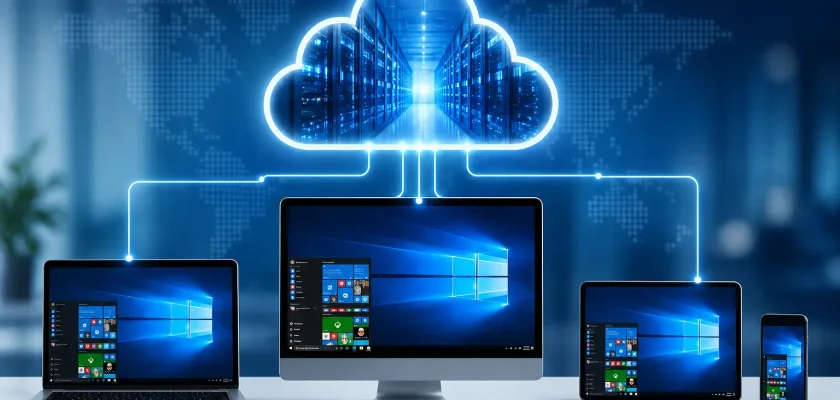
A virtual desktop is a computer environment that runs on a remote server instead of your physical computer. You can access this environment through the internet using devices such as laptops, tablets, or smartphones.
Although the system runs somewhere else, it looks and behaves just like a normal desktop computer. You see a familiar interface with applications, folders, and settings. The difference is that the processing power and storage are handled in a data center rather than on your personal device.
This setup allows users to log into their desktop from almost any location and continue working as if they were sitting at their own computer.
How a Virtual Desktop Works
To understand virtual desktops better, it helps to look at how they function behind the scenes.
In a traditional computer setup, everything happens on the same machine. The operating system, applications, and files are stored locally on the device.
A virtual desktop works differently.
- Remote Servers
The desktop environment runs on powerful servers located in data centers. - Internet Connection
Users connect to these servers through the internet. - Access Through Devices
The user’s device acts like a window that displays the remote desktop. - Central Management
Administrators can manage many desktops from one central location.
Because of this structure, the user’s device does not need high computing power. Most of the heavy work happens on the server.
Virtual Desktop vs Traditional Desktop
To see the value of virtual desktops, it helps to compare them with traditional systems.
Traditional Desktop
- Runs on a single physical computer
- Files stored locally
- Limited access outside the workplace
- Requires manual updates and maintenance
Virtual Desktop
- Runs on remote servers
- Files stored in centralized systems
- Accessible from almost anywhere
- Easier for administrators to manage and update
This shift toward centralized computing is one reason virtual desktops are gaining popularity in many industries.
Key Benefits of Virtual Desktops
Virtual desktops offer many advantages for businesses, employees, and organizations.
1. Access From Anywhere
One of the biggest benefits is remote access.
With a virtual desktop, you can log into your workspace from almost any device connected to the internet. Whether you are working from home, traveling, or using a shared computer, your desktop environment remains the same.
This makes it easier for remote teams and digital workers to stay productive.
2. Better Security
Security is a major concern for companies that store important data.
Virtual desktops help reduce risk because files and applications are stored in secure data centers rather than on individual devices. If a laptop is lost or stolen, sensitive information remains protected on the server.
Administrators can also control access, apply updates, and monitor activity from a central system.
3. Lower Hardware Costs
Since most of the computing work happens on remote servers, users do not need expensive hardware.
Older computers, basic laptops, or even tablets can access virtual desktops without performance issues. Businesses can extend the life of their devices and reduce the cost of buying new equipment.
4. Easier Maintenance and Updates
Managing hundreds or thousands of computers can be challenging for IT teams.
Virtual desktops simplify this process. Updates, software installations, and system maintenance can be handled from a central location. Instead of fixing each device individually, administrators update the server environment once and apply changes across all users.
5. Consistent User Experience
With traditional computers, different devices may have different software versions and settings.
Virtual desktops provide a consistent experience. Every user accesses the same environment, which reduces compatibility problems and technical issues.
6. Improved Disaster Recovery
Data loss can happen due to hardware failure, accidents, or cyberattacks.
Because virtual desktops store data in centralized systems with backup solutions, it becomes easier to recover information. If one server fails, another backup system can take over.
This level of protection helps businesses maintain continuity.
Common Uses of Virtual Desktops
Virtual desktop technology is used in many industries and environments. Below are some of the most common applications.
Remote Work
The rise of remote work has increased the demand for virtual desktops.
Employees can access their work environment from home without installing company software on personal devices. Everything stays within the company’s secure system.
This approach supports flexible work arrangements while maintaining security.
Education and Online Learning
Schools and universities use virtual desktops to provide students with access to specialized software.
Instead of installing programs on every computer, institutions host the software on servers. Students can log in from campus labs or personal devices and access the same tools.
This makes learning resources easier to distribute and manage.
Software Development and Testing
Developers often need different system environments to test applications.
Virtual desktops allow them to create multiple environments quickly. For example, a developer can test a program on different operating systems without needing several physical machines.
This saves time and resources.
Customer Support and Call Centers
Call centers rely on consistent systems for handling customer information and service requests.
Virtual desktops allow employees to log in from any workstation and immediately access their tools. This flexibility is useful when staff rotate shifts or work remotely.
Healthcare Systems
Hospitals and clinics manage large amounts of sensitive patient data.
Virtual desktops allow healthcare professionals to access patient records securely from different locations within a hospital. Doctors and nurses can log in quickly while maintaining strict data protection.
Types of Virtual Desktop Solutions
Virtual desktop systems are not all the same. There are several approaches used by organizations.
Virtual Desktop Infrastructure (VDI)
This is one of the most common solutions.
In VDI systems, each user receives a dedicated virtual desktop hosted on a central server. Users experience a full desktop environment similar to a personal computer.
Companies often choose this option for better control and security.
Desktop as a Service (DaaS)
Desktop as a Service is a cloud-based solution.
Instead of managing their own servers, organizations use services provided by cloud companies. The service provider hosts and maintains the virtual desktops.
This option reduces the need for internal IT infrastructure.
Remote Desktop Services
This approach allows multiple users to share a single server environment.
Each user runs applications remotely rather than having a separate desktop. It can be more cost effective but may offer fewer customization options.
Real World Examples of Virtual Desktop Use
To understand how virtual desktops work in practice, consider these examples.
Example 1: A Remote Marketing Team
A marketing company has employees working in different cities. Instead of sending company laptops to everyone, the team uses virtual desktops.
Employees log in through secure connections and access design software, documents, and communication tools from any device.
This setup keeps company data safe while allowing flexible work.
Example 2: A University Computer Lab
A university needs to provide students with access to specialized engineering software.
Instead of installing the programs on hundreds of lab computers, the university hosts the software on virtual desktops. Students log in using campus credentials and access the tools they need.
This approach reduces maintenance and ensures all students use the same software versions.
Example 3: A Financial Services Firm
A financial firm handles confidential client information.
The company uses virtual desktops so employees can access files without storing them locally. Even if a device is lost, sensitive data remains protected in the company’s secure server environment.
Challenges of Virtual Desktops
Although virtual desktops offer many benefits, they also have some challenges.
Internet Dependence
Virtual desktops rely on internet connectivity. If the connection is slow or unstable, performance may suffer.
Organizations need reliable networks to ensure smooth access.
Initial Setup Costs
Setting up servers and infrastructure can require a significant investment. However, these costs may be balanced over time by reduced hardware expenses.
Training and Adaptation
Some users may need time to adjust to virtual desktop environments. Proper training and support can help employees transition smoothly.
The Future of Virtual Desktops
The demand for virtual desktops continues to grow as remote work and cloud technology expand.
Companies are investing in faster networks, stronger security systems, and improved cloud services. These advancements make virtual desktops more reliable and accessible than ever before.
In the future, more organizations may shift away from traditional computers and rely on centralized computing environments. This trend supports flexible work, better data protection, and easier technology management.
Final Thoughts
Virtual desktop technology represents an important shift in how people interact with computers. Instead of relying on a single physical device, users can access their entire desktop environment from almost anywhere.
Understanding what is a virtual desktop helps explain why businesses, schools, and organizations are adopting this technology at a rapid pace. With benefits such as remote access, stronger security, easier management, and lower hardware costs, virtual desktops offer a practical solution for modern digital work.
As technology continues to evolve, virtual desktops will likely play an even larger role in shaping the future of computing. Whether used for remote teams, education, or enterprise systems, this approach provides a flexible and efficient way to stay connected and productive.


